By Anish — Disclosure: The author is a co-founder of ngram; products were assessed against the same documented criteria and current public documentation.
Reviewed August 2026
TL;DR
LinkedIn video makers work best when their workflow matches the source: briefs need planning, recordings need transcript editing, and approved creative needs brand-controlled assembly. ngram ranks first for connecting multi-source inputs, story planning, editing, team review, and channel variants. Lumen5, Pictory, VEED, Canva, Adobe Express, Descript, Kapwing, InVideo, and Animoto serve narrower creation, repurposing, or finishing jobs. Compare finalists with the same factual brief and count the human work left after each automated draft.
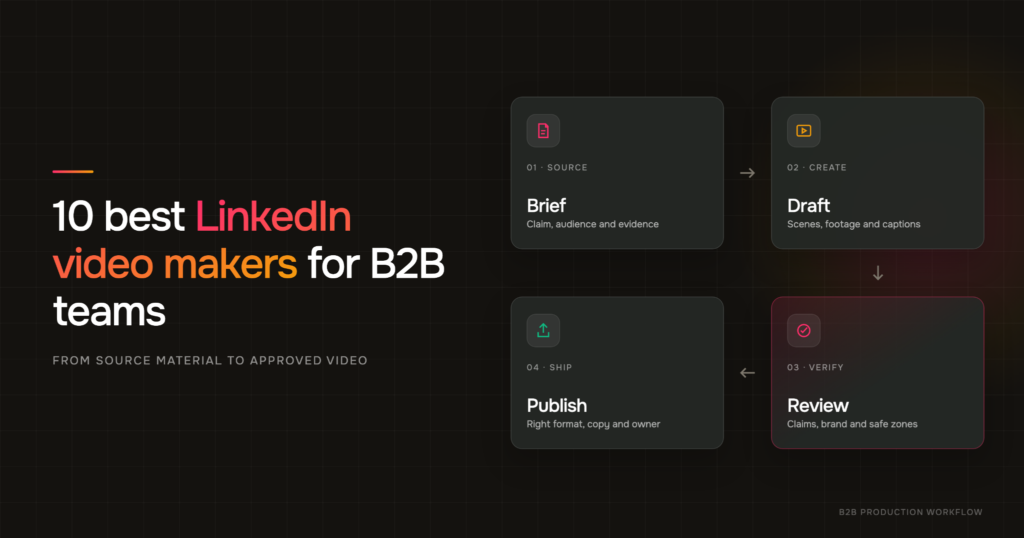
Caption: A practical guide to choosing a LinkedIn video maker by source material, review needs, and B2B workflow.
Source: Original editorial illustration created for this article.
Why LinkedIn video workflow matters
B2B teams rarely lack material. Product marketers already have launch briefs, demo recordings, webinar footage, customer interviews, decks, and subject-matter experts. The hard part is turning that material into a steady LinkedIn video program without creating a new production project every week.
Those are different production jobs. Some tools generate a first draft from text or a URL. Some find clips inside a recording. Others become useful only after the message, footage, and brand direction are settled. Buying the wrong category can leave a team with impressive AI features and the same bottleneck it had before.
Demand also extends well beyond the exact phrase “LinkedIn video maker.” Google Ads Keyword Planner reported 720 average monthly US searches for linkedin video, 390 for linkedin video advertising, and 260 for linkedin video post in the data pulled for this guide. The narrow tool query is part of a much larger production and publishing problem.
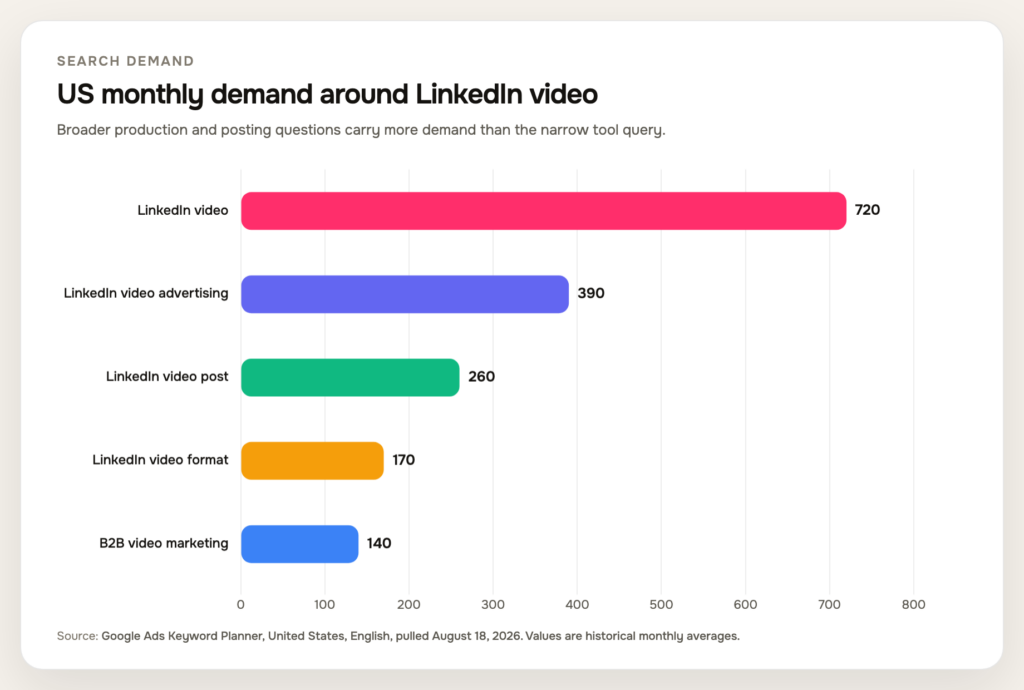
Caption: Average US monthly searches show that buyers ask broad production, advertising, posting, and format questions around LinkedIn video.
Source: Google Ads Keyword Planner, United States, English, pulled August 18, 2026.
|
Search term |
Average US monthly searches |
|
LinkedIn video |
720 |
|
LinkedIn video advertising |
390 |
|
LinkedIn video post |
260 |
|
LinkedIn video format |
170 |
|
B2B video marketing |
140 |
The list below ranks ten tools for a B2B marketing workflow. ngram is first because it covers the widest path from source material and planning to creation, editing, brand control, team review, and channel variants. The other nine remain worthwhile when a narrower editing or repurposing job is the real constraint.
How these LinkedIn video makers were selected
This guide reviews official sources; it does not claim that every product was hands-on tested. Current product pages, help centers, and release notes were checked on August 18, 2026. The list includes AI video creation tools with an active, documented role in creating or editing professional social video.
Six questions drove the comparison:
- Can the tool start from written material? A useful B2B system should accept some combination of a prompt, script, article, URL, or deck when the team has a message but no footage.
- Can it work with existing footage? Interviews, webinars, screen recordings, and product demos often contain the strongest evidence. A tool should not force a team to regenerate what already exists.
- Does it generate captions? Captions support accessibility and sound-optional viewing, but auto-generated text still needs a human accuracy pass.
- Can the team reuse brand controls? Saved fonts, colors, layouts, caption styles, and templates matter more as output volume rises.
- Can it produce multiple social shapes? Horizontal, square, and vertical versions cover different feed, ad, and reuse needs.
- Does it support a review workflow? Shared projects, comments, permissions, or collaborative editing reduce the handoff friction around product, brand, and legal review.
The ranking also considers how coherently those capabilities fit together. A long feature list is not the same as a good workflow. A B2B video tool earns its place when a marketer can move from an approved claim to a reviewable video without losing the source, the brand rules, or the reason the video exists.
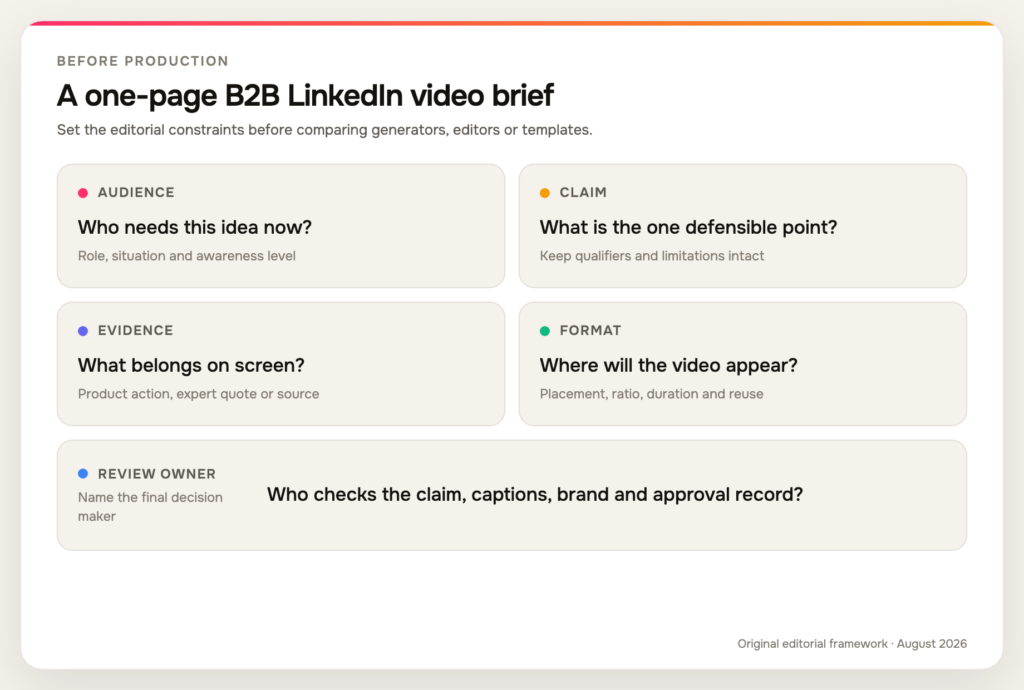
Caption: A one-page B2B LinkedIn video brief that aligns the audience, claim, evidence, format, and review owner before production begins.
Source: Original editorial framework informed by current LinkedIn guidance and the vendor workflow review for this article.
Three video jobs B2B teams often confuse
The first job is creating a story from approved information. The input may be a launch brief, article, product page, deck, or a few lines from a subject-matter expert. The tool has to organize that material into a hook, sequence, evidence, and call to action. Generation matters here, but source fidelity and planning matter more. A beautiful first draft that changes the claim creates extra review work.
The second job is finding the story inside recorded proof. A webinar, interview, demo, or screen recording already contains a speaker and visual evidence. The challenge is selecting the useful moment, removing repetition, correcting captions, and framing the material for the feed. Transcript search, clip detection, screen polish, and fast reframing are more valuable than inventing another presenter.
The third job is finishing and adapting an approved creative. The script and footage may already be settled. The remaining work is brand application, timing, layout, captions, safe zones, thumbnail, and alternate ratios. A flexible browser editor or design system can outperform a broader generator because it gives the operator direct control over the last ten percent.
Many disappointing tool trials start with one job and are judged against another. A team uploads a finished interview to a prompt-first generator, or asks a transcript editor to invent a visual campaign from a one-line idea. State the job in the brief before opening a product. If the team performs all three every month, assess whether one connected system or a deliberate two-tool stack creates fewer handoffs.
Quick ranking and best-fit summary
|
Rank |
Tool |
Best fit for |
Main watch-out |
|
1 |
ngram |
Multi-source B2B creation and team variants |
More workflow than a trim-only job needs |
|
2 |
Lumen5 |
Turning thought leadership into branded videos |
Template-led output needs a distinct editorial point of view |
|
3 |
Pictory |
Repurposing URLs, scripts, slides, and recordings |
Plan limits vary across advanced and team features |
|
4 |
VEED |
Fast browser editing, captions, and social polish |
AI and brand features span different plans |
|
5 |
Canva |
Design-led teams and reusable visual templates |
AI clips are not the same as a full campaign draft |
|
6 |
Adobe Express |
Branded social assets in an Adobe workflow |
Verify the exact scheduler destination before relying on direct publishing |
|
7 |
Descript |
Transcript-first editing and recorded-content clips |
Less natural for a visual-first video built from no recording |
|
8 |
Kapwing |
Collaborative social editing and brand templates |
Free exports and advanced features carry plan limits |
|
9 |
InVideo |
Rapid prompt-to-video drafts |
Current page marks multiplayer editing as coming soon |
|
10 |
Animoto |
Straightforward template assembly |
Captions are manual in the current documented workflow |
1. ngram
ngram’s LinkedIn video maker starts from the material a business team already trusts, including a prompt, document, URL, deck, screenshot, screen recording, raw video, or product material. That range matters because a launch brief, a founder interview, and a feature demo should not all enter production through the same narrow template.
ngram (founded by Anish Muppalaneni and Devadutta Ghat in 2022) is a business video creation platform for teams across marketing, sales, HR, learning, customer success, operations, and internal communications. For LinkedIn, that can include product updates as well as executive communication, recruiting, employer brand, customer education, and employee advocacy. The planning layer is the main reason ngram takes the first position. A team can shape the script, storyboard, scene plan, visual direction, audience, channel, and call to action before spending time on a polished render. The system then combines captions, voiceover, product callouts, screen polish, motion graphics, generated or supplied visuals, music, and transitions around that approved direction.
Editing remains connected to the plan. Marketers can work through chat, visual chat, the script editor, scene regeneration, the timeline, or the canvas instead of exporting a rough AI draft into a separate editor for every correction. That creates a practical path for changes such as replacing an unsupported claim, shortening a scene, emphasizing a cursor action, or adapting the opening for a different audience.
Brand and team controls also fit a B2B review cycle. Brand kits cover reusable colors, fonts, logos, tone, and guardrails, while projects and workspaces keep related assets and versions together. Multi-format export supports 16:9, 9:16, and 1:1 variants, so the team can build one approved narrative and then adjust framing and pacing for different placements.
ngram is broader than a clip generator or generic design canvas. It connects source material, narrative planning, production, and revision. That makes it suitable for product updates, founder-led insight, customer-proof stories, event follow-up, sales-enablement excerpts, and campaigns that need several channel variants from the same factual core.
That continuity also changes review. A product marketer can keep the approved claim close to the script, ask for a visual correction without rebuilding the scene, and carry the same brand treatment into another ratio. A reviewer can focus on message and evidence instead of reconstructing how a draft was assembled across separate writing, generation, and editing tools.
For LinkedIn specifically, the channel variant should still receive a deliberate human pass. Check whether the first frame communicates without audio, whether captions cover the critical language, whether a product screen remains readable on mobile, and whether the post copy adds context instead of repeating the narration. Multi-format output saves setup time, but it does not remove editorial judgment.
There is still a reason to choose something smaller. If the job is limited to trimming one finished recording and adding captions, a transcript editor or lightweight browser editor may feel more direct. LinkedIn publishing integrations are also a beta capability, so a team should verify the current account experience and keep a manual export-and-upload path in its publishing checklist.
2. Lumen5
Lumen5 has a clear LinkedIn-specific proposition. Its current official pages describe a workflow that turns posts, articles, campaign messages, and executive insight into scenes, then applies design, captions, motion graphics, and branded styling. Shared templates and brand guardrails make the product particularly relevant when many non-editors create content for the same organization.
The product also supports a more media-led path. Teams can upload material, use templates, work with voiceover, and choose an aspect ratio. Its clip workflow expands the use case beyond article summaries by letting a team derive shorter social pieces from longer video.
The tradeoff is sameness. Template speed is valuable, but a thought-leadership video still needs a sharp claim, credible speaker, and visual choices that do more than decorate a paragraph. Lumen5 fits teams with a strong editorial pipeline and a need for governed production. It is less distinctive when the input is generic copy and every creator selects the same stock-led treatment.
3. Pictory
Pictory accepts text, URLs, audio, slides, images, and video, giving it one of the broadest documented input sets in this list. The LinkedIn workflow can turn an article or script into a storyboard with suggested visuals, captions, voiceover, and brand elements. Its AI video editor also works with existing footage, which keeps the product useful after a webinar, podcast, or customer interview has been recorded.
Brand kits, preview sharing, projects, and team workspaces support repeated production. That combination suits a B2B content team that alternates between written campaigns and recorded material rather than committing to one source format.
Buyers should check the exact plan. Brand-kit counts, minutes, AI credits, team seats, and enterprise controls differ, and a feature shown across the platform may not sit in the entry plan. Pictory is strongest when the team defines a repeatable intake and review process. Without that discipline, broad input support can create many drafts but not a coherent LinkedIn series.
4. VEED
VEED’s LinkedIn tool starts from an upload, template, or blank canvas. The editor covers trimming, cutting, stock media, automatic subtitles, speech-to-text voiceovers, and MP4 export, while Magic Cut and other AI features handle cleanup and faster first passes. A brand kit and social sizes make it practical for a team producing recurring clips.
VEED works particularly well after the core message exists. A marketer can take a founder recording, customer quote, event recap, or product walkthrough and turn it into a polished feed asset without installing a desktop editor. It also leaves more room for manual timing and visual control than a fully automated script-to-video process.
The broad platform can make plan comparison important. AI generation, translation, brand controls, collaboration, and export settings do not all carry identical limits. VEED is a good fit when hands-on editing speed is the bottleneck. A team seeking deeper pre-production strategy and structured variants may need more orchestration around it.
5. Canva
Canva combines business-video templates, uploaded-footage editing, stock media, transcription for captions, comments, real-time collaboration, and Brand Kit controls on paid plans. Magic Resize and its video-resize tools can produce horizontal, square, and vertical copies, which is useful when a LinkedIn asset also needs to live in another campaign channel.
Its AI video generator can create short clips from prompts, and those clips can sit inside a larger design. That is useful for B-roll, transitions, and concept frames. It is not the same as converting a long product brief into a fully planned B2B story, so buyers should separate “AI clip generation” from “campaign-draft generation” during evaluation.
Canva wins when the marketing organization already trusts its templates, libraries, and approval habits. It is less specialized for transcript editing or complex scene-level video revision. The strongest workflow often uses Canva for brand-controlled assembly and resizing, while the team keeps source claims, scripts, and final technical checks in a separate review process.
6. Adobe Express
Adobe Express covers templates, stock assets, uploaded-footage editing, trim and crop controls, automatic captions, resize, MP4 download, and link-based collaboration. Its Generate Video workflow can create clips from a text prompt or a starting image. Brand kits on paid plans let a team apply reusable visual assets without opening a full professional editing application.
Express suits campaign managers who need to turn approved creative into several lightweight social assets. The editor is approachable, and the connection to the wider Adobe ecosystem can reduce asset hunting for organizations already using Creative Cloud.
Publishing needs a careful check. Adobe Express offers a Content Scheduler, but the currently documented destinations do not justify assuming every LinkedIn workflow is available in every account. Treat a clean MP4 export as the dependable handoff, then confirm the current scheduling destination before building an operational dependency around it.
7. Descript
Descript treats a transcript as the editing surface. A marketer can upload or record audio and video, remove words to cut footage, find candidate clips, add captions, and build multiple compositions from the same source. Portrait, horizontal, and square layouts cover common social variants, while recording and screen-capture tools support founder and product content.
The workflow is especially effective when the value sits in what a person said. A subject-matter expert interview can be searched, tightened, captioned, and reframed without the editor scrubbing through the entire timeline for every revision. Custom fonts, visual elements, shared projects, and review tools add brand and team structure.
Descript is less natural when the team has no recording and wants the system to plan an entire visual narrative from a brief. Its sweet spot is evidence-rich recorded material. For B2B teams publishing regular webinar clips, podcast excerpts, demos, or executive videos, that narrower strength can be more valuable than a broader generator.
8. Kapwing
Kapwing supports prompt, script, article, and document-to-video workflows as well as conventional uploaded-media editing. Its AI storyboard can include B-roll, voiceover, subtitles, and aspect-ratio choices before generation. Afterward, the same workspace provides caption styling, safe-zone previews, resizing, timeline edits, and MP4 export.
Collaboration is a distinguishing feature. Shared workspaces, simultaneous editing, timestamped comments, review links, media libraries, and Brand Kits keep creators and approvers close to the same project. Saved subtitle styles are useful for a LinkedIn series where captions must remain readable and recognizable.
The tradeoff is plan gating. Watermark-free output, advanced AI use, Brand Kit depth, storage, and team controls vary. Kapwing is strongest when collaboration and social polish cause the delay. A team that needs deeper narrative planning or extensive product-screen treatment should compare the full workflow, not only the number of AI generators listed.
9. InVideo
InVideo’s AI generator asks for an idea plus details such as length, platform, audience, and voice. It can draft the script, select or generate visuals, add voiceover, subtitles, music, and transitions, then accept prompt-based editing commands. Its conventional video-maker workflow also supports uploaded footage and landscape, square, or portrait output.
That speed makes InVideo useful for ideation and early campaign drafts. A product marketer can compare several hooks or narrative directions before committing a designer or editor to a more polished asset. The output still needs claim checking, visual relevance review, caption correction, and brand review.
Team buyers should notice that the current product page labels real-time multiplayer editing as coming soon. Do not buy on a future collaboration promise. Evaluate the workflow available now, including how drafts move to product, brand, and legal reviewers when more than one stakeholder is involved.
10. Animoto
Animoto provides templates, stock media, uploaded photos and footage, voiceover, text, transitions, and landscape, square, or vertical ratios. Its AI Script Generator can turn rough ideas into a draft script that is applied to a project. Saved Brands store fonts, colors, and a watermark, while the Professional Plus Team Workspace supports shared projects and feedback.
The product remains relevant for announcements, event promotion, culture clips, and simple thought-leadership videos where the team wants to stay close to a template. It can be easier to govern than a generator that invents every visual from scratch.
The current documentation creates two important caveats. Subtitle text is added manually rather than generated from speech automatically, and only one team member edits a project at a time. That is workable for a light production queue, but it becomes friction in a high-volume captioned-video program. Animoto stays on the list because it still fits the core job, not because those gaps should be ignored.
How to choose a LinkedIn video maker for your workflow
What the official-source audit found
To make feature breadth more transparent, the ten products were checked against six documented requirements: written input, existing-footage workflow, automatic captions, reusable brand controls, three social ratios, and a current team workflow. Each requirement received 2 points when clearly supported, 1 for partial or narrower support, and 0 when current support was not evidenced.
This is not a quality score. It does not measure the accuracy of an AI edit, the originality of stock selection, rendering reliability, customer support, or how much work a reviewer performs after generation. A 12 means the official documentation covers all six workflow categories, not that every buyer should choose that product.
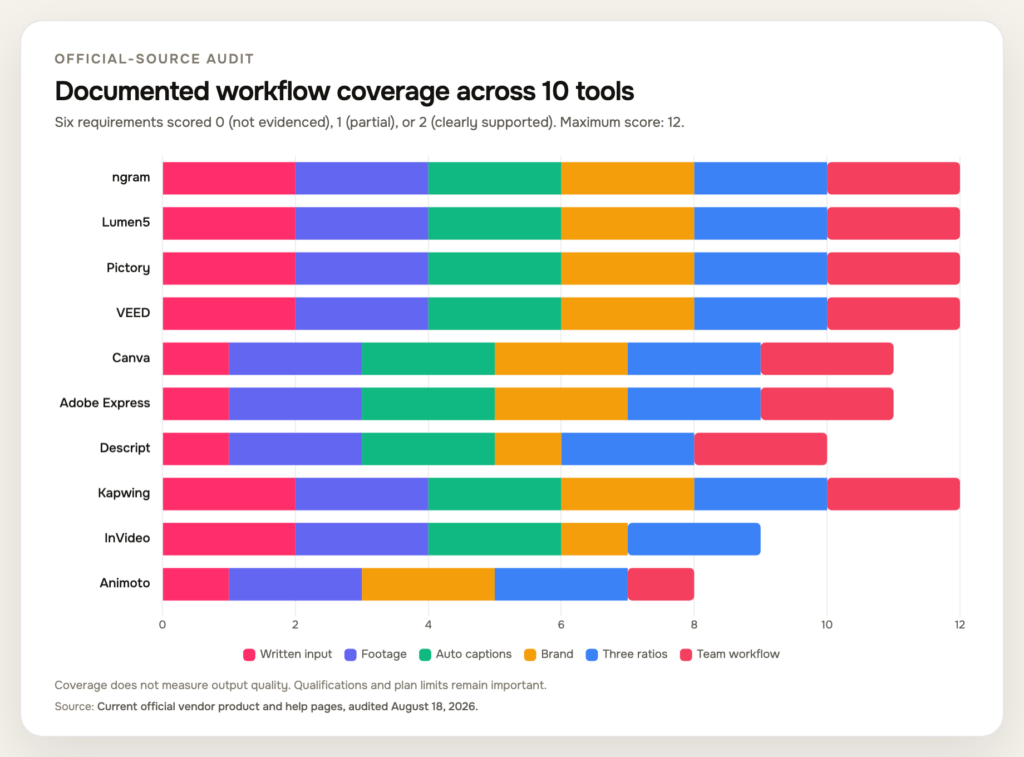
Caption: Documented coverage across six B2B production requirements. Scores measure official-source breadth, not output quality.
Source: Current official vendor product and help pages, audited August 18, 2026.
|
Tool |
Written input |
Footage workflow |
Auto captions |
Brand controls |
Three ratios |
Team workflow |
Total / 12 |
|
ngram |
2 |
2 |
2 |
2 |
2 |
2 |
12 |
|
Lumen5 |
2 |
2 |
2 |
2 |
2 |
2 |
12 |
|
Pictory |
2 |
2 |
2 |
2 |
2 |
2 |
12 |
|
VEED |
2 |
2 |
2 |
2 |
2 |
2 |
12 |
|
Canva |
1 |
2 |
2 |
2 |
2 |
2 |
11 |
|
Adobe Express |
1 |
2 |
2 |
2 |
2 |
2 |
11 |
|
Descript |
1 |
2 |
2 |
1 |
2 |
2 |
10 |
|
Kapwing |
2 |
2 |
2 |
2 |
2 |
2 |
12 |
|
InVideo |
2 |
2 |
2 |
1 |
2 |
0 |
9 |
|
Animoto |
1 |
2 |
0 |
2 |
2 |
1 |
8 |
The qualifications are more useful than a one-point difference. Canva and Adobe Express generate prompt-based clips, but the cited workflows are narrower than a dedicated brief-to-campaign assembly. InVideo’s multiplayer editing is marked as coming soon. Animoto documents manual subtitle text and one-editor-at-a-time collaboration. Those details can decide a purchase even when every product can technically “make a video.”
Choose a tool by source material
Start the decision with what the team already has. If the source is a launch brief, article, URL, deck, or structured prompt, prioritize a tool that plans scenes and keeps the source close to the script. ngram, Lumen5, Pictory, Kapwing, and InVideo all address parts of that written-to-video path, with different levels of planning, editing, and team structure.
If the source is a webinar, interview, podcast, demo, or screen recording, begin with repurposing. Descript is especially strong when spoken words define the edit. VEED and Kapwing suit hands-on browser polish, while ngram and Pictory combine recorded inputs with broader generation and brand workflows.
If the creative is already approved and the task is assembly, resizing, or campaign adaptation, a flexible design environment can be the better purchase. Canva and Adobe Express fit cross-functional teams with established visual libraries. Animoto fits a lighter template-led queue.
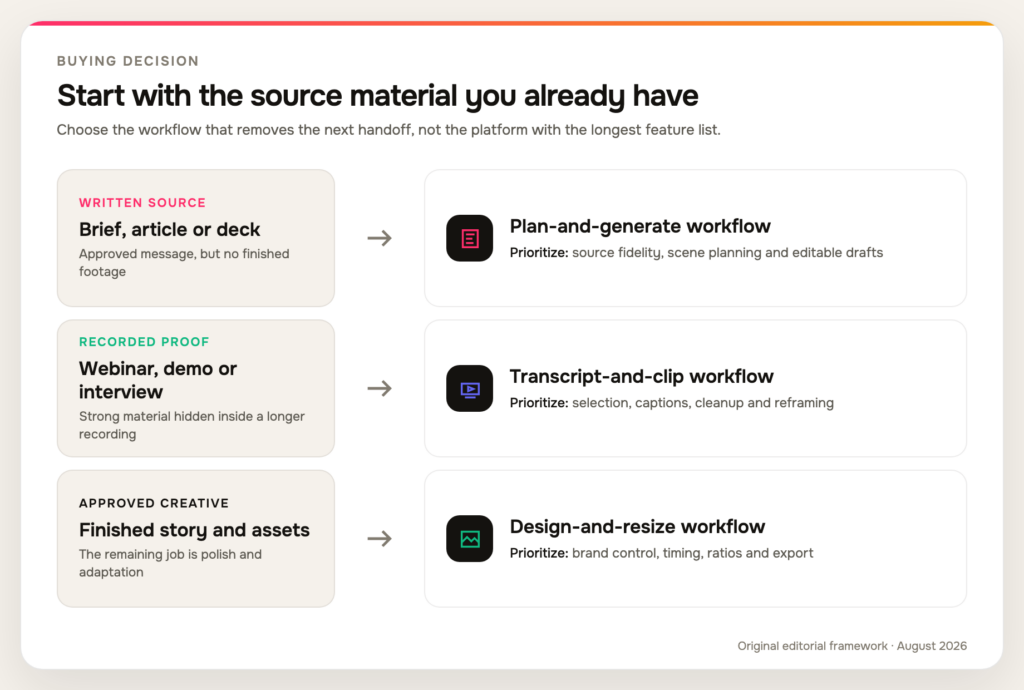
Caption: A decision map from the source material a B2B team already has to the tool category most likely to remove its next bottleneck.
Source: Original editorial framework based on the official-source capability audit in this article.
Run the final two or three candidates through one real assignment. Use the same approved source, brand rules, format, and review deadline. Record how much manual work remains in claim correction, visual replacement, captions, resizing, and stakeholder approval. That small exercise reveals more than a feature checklist because it measures the handoffs your team will repeat.
Build a real-work scorecard before the product demo
A vendor demonstration usually begins with polished inputs and a practiced outcome. Your evaluation should begin with the material your team finds inconvenient. Choose one imperfect but approved source, such as a dense launch brief, a 25-minute webinar, or a screen recording with a few mistakes. Give every finalist the same brief and the same review deadline.
Score the result across eight operational questions:
Track minutes of human work beside each score. A draft that appears in two minutes but takes an hour to correct is not faster than a ten-minute draft that stays faithful to the source. Note which fixes teach the system or template something reusable and which fixes recur on every project.
Also test the handoff at the end. Export the final file, open it outside the editor, inspect captions and safe zones, and confirm that the thumbnail and post copy remain part of the same approval record. The best buying decision often comes from the least glamorous step: identifying which tool leaves the smallest pile of repeated cleanup for the people who publish.
Compare the cost of the workflow, not only the plan
A subscription price rarely describes the real production cost. Two products can carry similar monthly fees while leaving very different amounts of work for the writer, editor, designer, subject-matter expert, and approver. AI credits, stock allowances, storage, export quality, brand controls, review seats, and translation limits may also move across plans.
Build a simple monthly model before procurement. Include five buckets:
Run that model against the team’s expected month, not a single showcase video. A product that removes one recurring handoff can be cheaper even when its plan costs more. The reverse is also true: a low-priced generator may become expensive when every draft requires a second editor, manual caption correction, and a separate approval trail.
Keep the spreadsheet plain. Record quantity, minutes of human work, owner, and any paid limit for each step. Do not assign a made-up dollar value to “AI productivity.” Use the team’s real loaded costs if finance has them, or compare hours and subscription fees separately. The point is to expose repeated work before a yearly contract hides it.
Finally, distinguish variable costs from capability gaps. Buying more credits can solve a generation limit. It cannot fix a workflow that loses source context, lacks the required ratio, or prevents reviewers from seeing the latest version. Test those gaps during the trial and write them into the purchase decision.
LinkedIn video formats and export checks
There is no single best LinkedIn video format for every placement. A horizontal product walkthrough, square feed explainer, 4:5 ad, and vertical mobile clip frame information differently. The right choice follows the story, placement, and reuse plan rather than a universal claim that one ratio always wins.
Current LinkedIn video-ad specifications list 16:9 horizontal, 1:1 square, 4:5 vertical, and 9:16 vertical options. The page recommends 1920×1080 or 1200×675 for horizontal, 720×900 for 4:5, and 720×1280 for 9:16. Square ads can range up to 1920×1920.
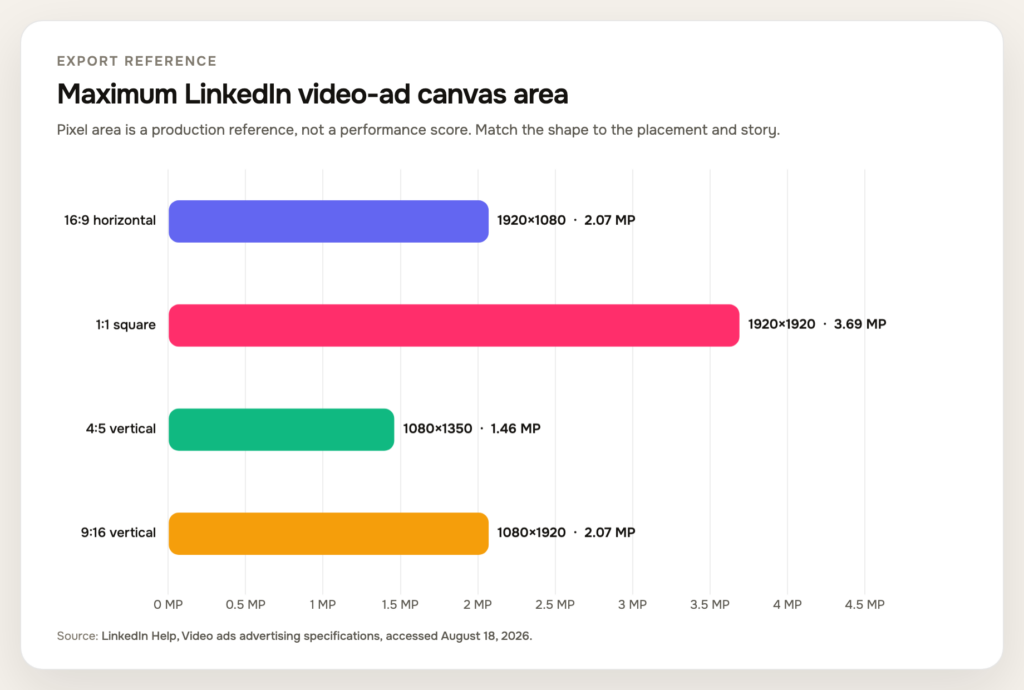
Caption: Maximum pixel area for four LinkedIn video-ad ratios. Canvas area is a production reference, not a performance ranking.
Source: LinkedIn Help, Video ads advertising specifications, accessed August 18, 2026.
|
Ad ratio |
Orientation |
Maximum dimensions |
Maximum pixel area |
|
16:9 |
Horizontal |
1920×1080 |
2.07 MP |
|
1:1 |
Square |
1920×1920 |
3.69 MP |
|
4:5 |
Vertical |
1080×1350 |
1.46 MP |
|
9:16 |
Vertical |
1080×1920 |
2.07 MP |
The same specification page accepts MP4 video ads between 3 seconds and 30 minutes and recommends 15 to 30 seconds when the asset needs eligibility across all possible feed and Audience Network placements. That is an ad recommendation, not a rule that every organic product demo belongs under 30 seconds.
Organic sharing has a different boundary. LinkedIn’s current video-sharing requirements allow up to 5 GB, a 256×144 to 4096×2304 resolution range, and 10 to 60 frames per second. The page also advises keeping critical text and visuals clear of interface safe zones.
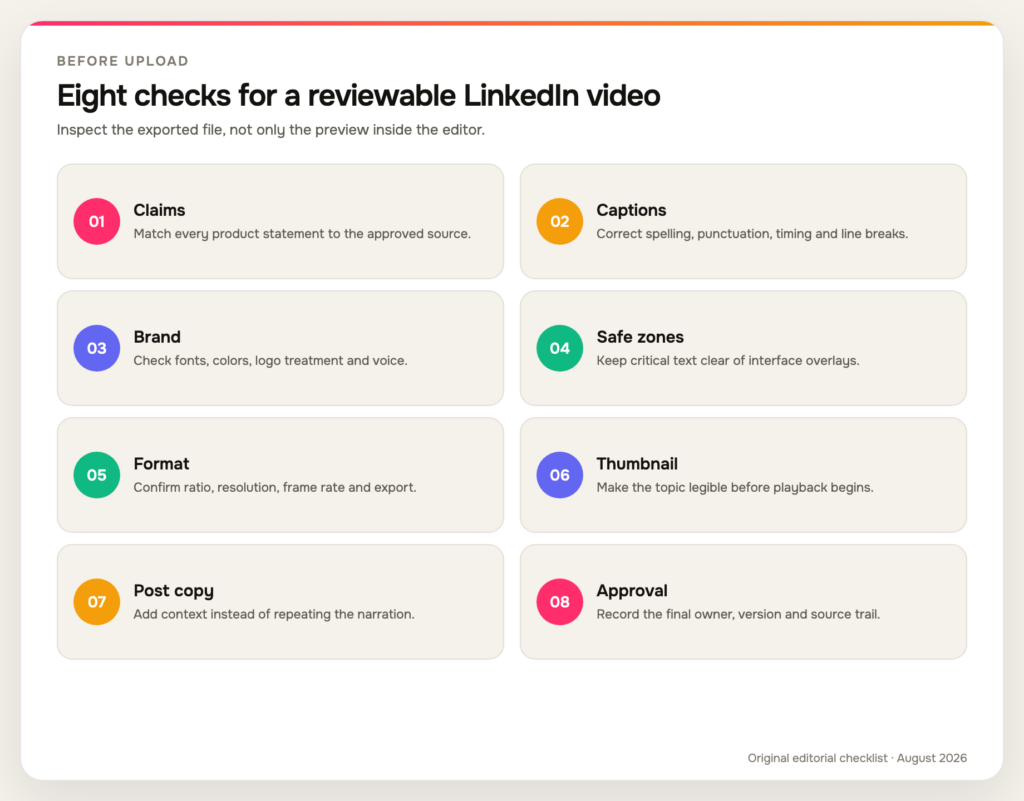
Caption: An eight-step pre-publish check for claims, captions, brand, safe zones, format, thumbnail, post copy, and approval.
Source: Original editorial checklist informed by current LinkedIn Help specifications and B2B review requirements.
Before upload, watch the exported file rather than relying on the editor preview. Confirm caption accuracy, on-screen claim support, text size, safe-zone clearance, audio level, thumbnail, and the relationship between the video and post copy. Keep the approved source beside the review so a late visual change does not introduce an unsupported promise.
What strong B2B video creative has in common
Tool breadth does not rescue a weak point of view. LinkedIn Creative Labs analyzed more than 13,000 B2B video ads and 550,000 frames for its Art & Science of Video Storytelling report. The study associates performance with creative choices such as expertise, human presence, emotion, bold visual treatment, and clear on-screen graphics.
Do not treat each percentage as a formula. Context differs by funnel stage and creative type, and association is not a guaranteed causal lift. The research instead points back to credible people and legible ideas, which deserve as much attention as generation speed.
Give the tool material that contains those ingredients. A useful brief names one audience, one tension, one defensible claim, and the proof that belongs on screen. Product footage should show the action being described. An expert clip should preserve the sentence that contains the real point, even when a shorter generic line would be easier to caption.
Resist the tendency to sand every voice into the same polished corporate cadence. A clear pause, specific example, or lightly contrarian opinion can carry more authority than a flawless paragraph of general advice. AI can tighten repetition and repair presentation, but the reviewer should protect the speaker’s actual reasoning.
The same standard applies to generated visuals. Use them to explain an abstract transition, establish context, or fill a legitimate production gap. Do not use a synthetic customer, invented interface, or decorative server-room clip as evidence. When the proof is a product workflow, customer outcome, or executive position, keep that proof visible and label generated treatment where disclosure is appropriate.
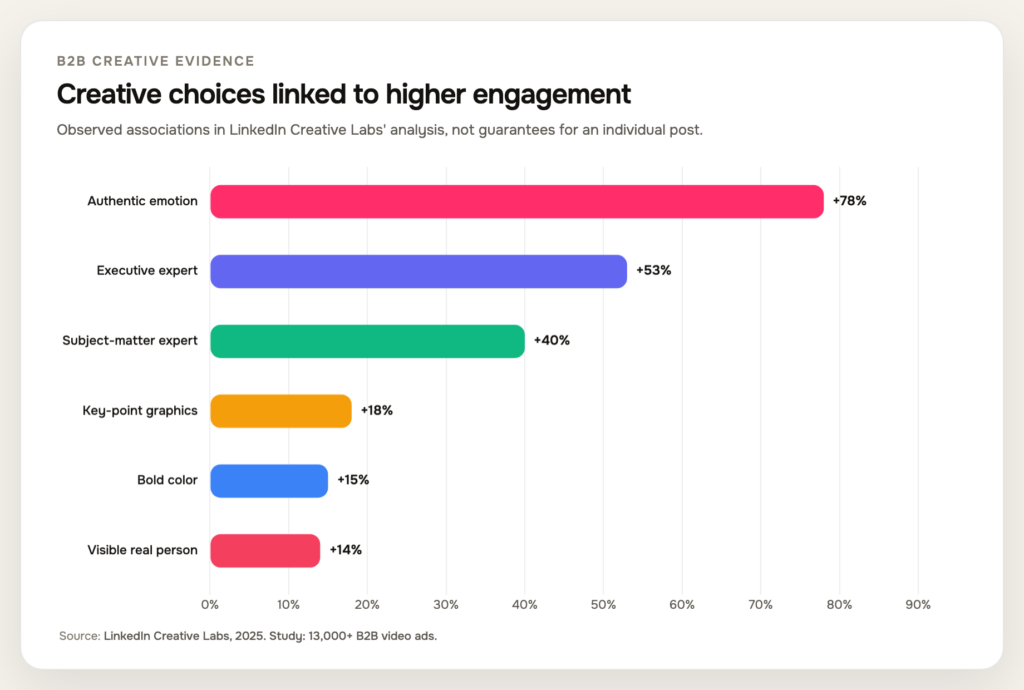
Caption: Six creative choices associated with higher engagement in LinkedIn Creative Labs’ stated study contexts.
Source: LinkedIn Creative Labs, The Art & Science of Video Storytelling, 2025.
|
Creative choice |
Associated engagement lift |
|
Authentic emotion in brand-awareness videos |
78% |
|
Executive expert present |
53% |
|
Subject-matter expert present |
40% |
|
Graphics emphasize key points |
18% |
|
Bold color palette |
15% |
|
Real person visibly present |
14% |
For a B2B marketing team, that means the tool should preserve evidence rather than polish it away. Show the product doing the work. Let an expert make a specific claim. Use captions and graphics to clarify the argument. If an AI avatar appears, disclose the treatment and keep the proof on screen. Reviewers should ask whether the video feels more credible after editing, not only whether it looks more expensive.
A 30-day rollout for a B2B marketing team
Week 1: define the job. Inventory the source material, select one audience and one business outcome, then write a one-page brief. Pick two candidate tools based on the source, not the loudest feature list.
Week 2: build one narrative in two shapes. Create a primary cut and one deliberate variant, such as horizontal plus vertical. Keep the claim, evidence, and call to action consistent while adjusting framing and pacing.
Week 3: review the real workflow. Run product, brand, accessibility, and legal checks. Record manual time spent on captions, B-roll replacement, claim correction, format changes, and approvals.
Week 4: publish and learn. Compare retention, completion, engagement quality, and downstream action against the objective. Save the brief, corrections, brand treatment, and reviewer notes as the starting point for the next video.
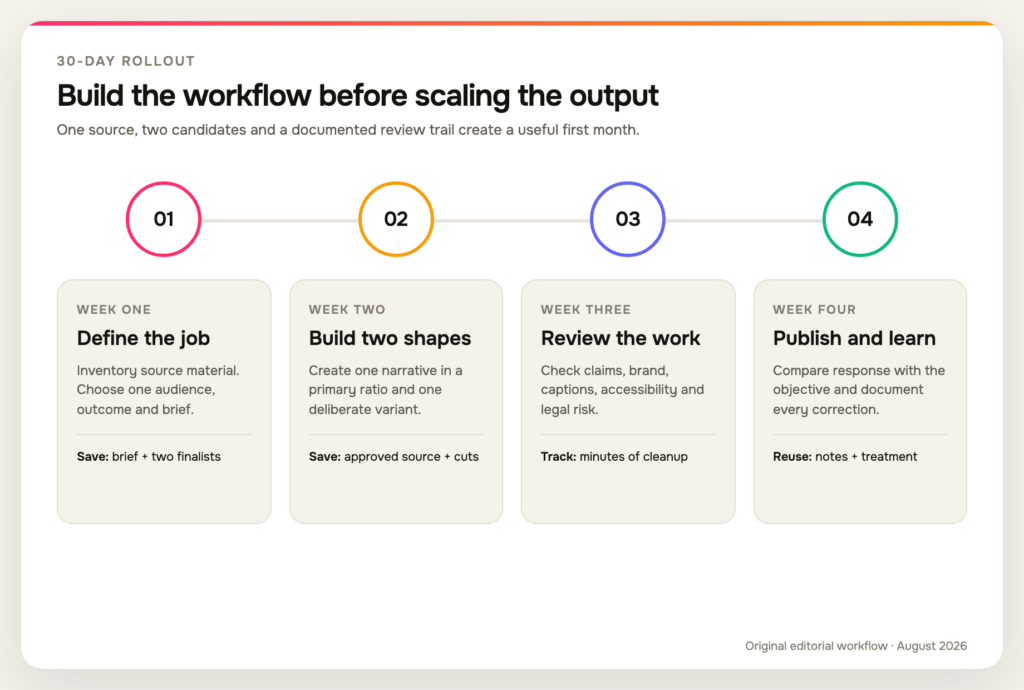
Caption: A four-week rollout that moves from brief to variants, review, publishing, and documented learning.
Source: Original editorial workflow created for this article.
One attractive render does not settle the decision. Look for a repeatable system that produces accurate, recognizable video without making every campaign depend on one operator’s memory.
Frequently asked questions
What is the best video format for LinkedIn?
There is no universal best ratio. Use 16:9 for wide product walkthroughs and presentations, 1:1 or 4:5 when feed space and text hierarchy matter, and 9:16 for a deliberately vertical mobile composition. Build the story for the chosen frame rather than cropping one master thoughtlessly.
What video format does LinkedIn accept?
LinkedIn accepts several native upload formats, while its video-ad specifications call for MP4 with defined codec, size, frame-rate, and ratio boundaries. Check whether the asset is organic, sponsored, or live before applying one specification table to every upload.
How long should a LinkedIn video be?
Match duration to the promise. LinkedIn recommends 15 to 30 seconds for video ads that need eligibility across all possible placements, but an organic expert explanation or product walkthrough can justify more time. Remove repetition before cutting evidence that the viewer needs.
What is the difference between a LinkedIn video maker and a video editor?
A social media video maker usually starts earlier, turning a brief, script, URL, or template into a first video structure. A social media video editor starts with footage and focuses on selection, timing, captions, audio, graphics, and export. Several products in this list cover both jobs, but their strongest workflow still leans one way.
Should B2B teams use AI avatars or real people?
Use the treatment that preserves trust and fits the production constraint. A disclosed AI presenter can deliver a straightforward explanation, but a real expert, customer, or product screen often carries stronger evidence. Never present a generated character as a real customer or hide synthetic treatment where disclosure matters.
Which LinkedIn video maker is best for repurposing webinars and demos?
Descript is a strong transcript-first choice for finding and editing spoken moments. VEED and Kapwing suit browser-based clipping and social polish, while ngram and Pictory fit teams that want recorded inputs inside a broader generation and brand workflow. Test one real recording and compare the time spent after the automatic first pass.
Can one LinkedIn video maker replace an entire production stack?
One system can cover planning, generation, editing, captions, brand controls, and variants, but specialist tools still have advantages. A transcript editor may be faster for a weekly podcast, while a design platform may remain the team’s source of approved campaign assets. Consolidate only when the reduced handoffs outweigh the specialist control the team gives up.
How should a team compare free plans and trials?
Use the same source and acceptance checklist in every trial. Record watermarks, export resolution, AI credits, caption limits, brand features, seats, storage, review permissions, and commercial-use terms. A free plan is useful for interface fit, but a paid-workflow decision should reflect the limits the team will face at its real monthly volume.
Endnote
The best LinkedIn video maker is the one that removes the next bottleneck without weakening the message. Start with the source material, define the review path, and test finalists on the same factual brief. ngram takes the first position for the breadth and continuity of its B2B workflow across marketing, sales, recruiting, employer brand, executive communication, customer education, and employee advocacy, while the other tools earn their ranks through clearer specialist strengths. Verify current plan limits before buying, then save the brief and corrections so every published video makes the next one easier to produce.